
Getting started
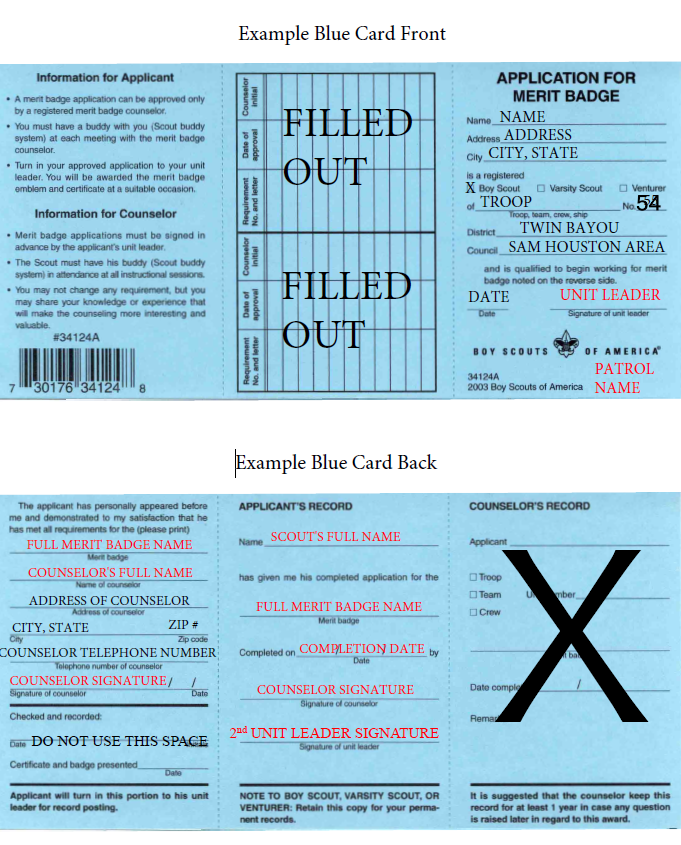
Before beginning with a merit badge counselor or enrolling in a Merit Badge class, Troop 54 Scouts need to obtain approval and a blue card from their PASM.
Which badges first?
Download Troop 54’s recommended merit badge sequence (pdf).
Blue cards
Most Troop 54 Merit Badge Counselors use electronic blue cards in Scoutbook. The Scout should login to her account, click on her Profile, then Scout’s Merit Badges. Scroll to the bottom of the screen and click the button “Start Another Merit Badge“.
When your paper blue card has all the requirements signed off by the Merit Badge Counselor, send the blue card to the Advancement Chair, advancement@troop54houston.org.
If you used an electronic blue card in Scoutbook, there is nothing to turn in – the system will automatically record the completion when the Merit Badge Counselor marks it as “Approved”.
If you are working with a Merit Badge Counselor or a camp that prefers to use paper blue cards (example, Houston Museum of Natural Science), you may request a paper blue card from the Scoutmaster or PASM.
Resources
- Find a Troop 54 Merit Badge Counselor (password-protected)
- Merit Badge Requirements – Scouting America official website
- Merit Badges A-Z – download the free pamphlets PDFs from the Scouting America website.
- For Troop 54 registered adult leaders – how to become a Merit Badge Counselor